
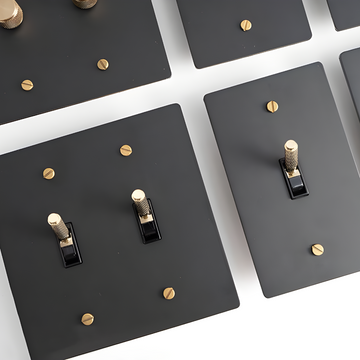
KLAS switch plate — installation guide

KLAS · solid brass switch plates
Installation guide
Before you start
Mains wiring must be done by a licensed electrician, with the power off at the breaker, following the NEC / CEC and local codes. Metal plates must be grounded where the code requires it (NEC 404.9). Keep this guide for the next owner.
In the box
Your solid brass plate, the device(s) you chose, two brass-finish screws per position. Sizes: 1-gang 72 × 120 mm, 2-gang 120 × 120, 3-gang 165 × 120, 4-gang 210 × 120 mm; all 120 mm (4.72 in) tall.
You will need
Flat and Phillips screwdrivers, a non-contact voltage tester, wire strippers, wire connectors, and a small spirit level.
Six steps
- Switch off and testTurn off the breaker for the circuit. Check the wires at the box with a voltage tester before touching anything.
- Remove the old plate and deviceUnscrew the old plate, then the device. Before disconnecting, note or photograph which wire goes where — especially on 3-way switches and GFCI outlets.
- Check the boxEach position of your plate needs one standard gang of a US/Canada box, screw holes 83.5 mm (3.29 in) apart. Multi-gang plates fit a multi-gang box of the same count. Dimmers, GFCI and USB outlets need a standard-depth box.
- Wire the deviceConnect the wires as in the table below (or on the device). Strip to the gauge mark, keep bare copper under the screw heads, tighten firmly. Fold the wires neatly into the box.
- Fit the device and plateOffer the device into the box and set it level. Hold the brass plate over it and fix with the two supplied screws: they pass through the plate and the device’s mounting strap into the box. Tighten evenly until the plate sits flat — do not overtighten.
- Restore power and testSwitch the breaker back on. Test every position. On a GFCI press TEST, then RESET.
Looking after brass
Each plate is hand-brushed, so no two are identical, and the finish deepens with time. Wipe with a dry, soft cloth. No polish, abrasives or solvents — they strip the finish.
Wiring by device
Which wire goes where
| Device | Connections | Notes |
|---|---|---|
| Toggle, single-pole | Hot in and switched hot out on the two brass terminals; ground on the green screw. Neutral is not switched — connect it straight through. | No neutral needed at the switch. |
| Toggle, 3-way (two locations) | Common terminal (darker screw) takes the hot at the first switch and the light at the second. The two travellers link the two switches. Ground both. | Needs a 3-way at each location. |
| Toggle, 4-way (three or more locations) | Fits between two 3-ways: one pair of travellers in, one pair out. Ground it. | One 4-way per extra location. |
| Rotary dimmer, grounded | Line in, load out, ground. Press the knob to switch, turn to dim. | Rated for dimmable LED, halogen and incandescent lights. |
| Rotary dimmer, basic | Two wires: line in, load out. No ground wire on the dimmer — ground the light fitting as normal. | Use in a metal box or where there is no ground. |
| Rotary dimmer, 3-way | Wire as a 3-way with a KLAS 3-way toggle at the other location. One dimmer per light circuit. | For three or more locations add a 4-way toggle in between. |
| 0–10V dimmer | Brown = DIM+, blue = DIM–, to the driver’s dimming terminals only. Never connect to mains. Power to the driver is switched separately. | Keep its wiring apart from mains wiring in the box. |
| Fan speed switch | Black = hot, white = to the fan, green = ground. Copper wire only. One fan per control. | Not for lights, outlets or transformers. |
| Outlet 15A / 20A | Brass screw = hot, silver screw = neutral, green screw = ground. A 20A outlet (T-shaped slot) must be on a 20A circuit. | Tamper-resistant. |
| GFCI outlet | Incoming power to the LINE terminals. LOAD terminals protect any outlets further down the circuit. Press TEST then RESET after installing. | Test monthly. |
| USB outlets (USB-A + C, dual USB-C) | Wire as a standard outlet: hot, neutral, ground. | Needs a standard-depth box. |
| CAT 6 / RJ11 ports | Low voltage only. CAT 6: T568B (or A, matching the other end). RJ11: line 1 on the centre pair. Keep away from mains wiring unless a barrier separates them. | Use a low-voltage bracket or its own box section. |
| Decora cut-out | Fit your own Decora-style device to the box first, then the plate over it. | Smart switches, sensors. |
| Blank | No device; the position is closed. |
Single-pole switch, the usual case
Wire colours follow North American practice: black = hot, white = neutral, green or bare = ground, red = traveller or switched hot. Always confirm with a tester. Specifications may change; ask us before installing if anything looks different from this guide.